Introduction: The Digital Transformation of Karnataka’s Higher Education
The Unified University & College Management System (UUCMS) is not merely a software portal; it is a paradigm shift in the governance of higher education in India. Launched as a flagship project by the Department of Higher Education, Government of Karnataka, on 23 August 2021, it represents the nation’s first comprehensive state-wide implementation of the National Education Policy (NEP) 2020. Developed through a strategic collaboration between the Centre for Smart Governance (CSG), the Department of e-Governance, and the State Project Monitoring Unit (SPMU), UUCMS aims to digitise the entire student lifecycle and administrative framework of Higher Education Institutions (HEIs).
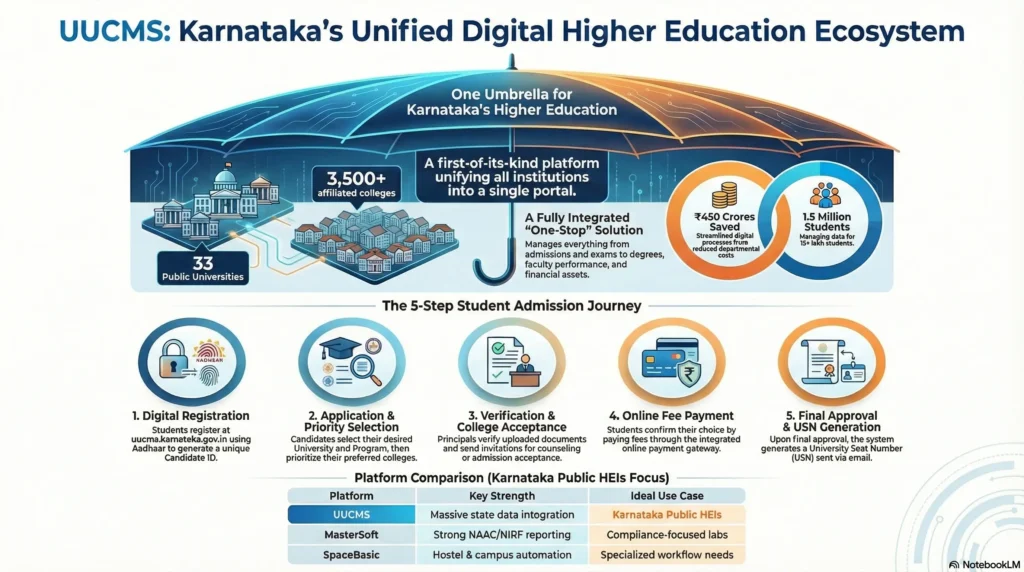
From the initial admission module launched by Union Education Minister Dharmendra Pradhan to its expansion into examination and faculty management, the platform serves as a single source of truth. Its significance is underscored by international partnerships, such as the pact inked with Pennsylvania’s Montgomery Community College in the United States, aimed at elevating Karnataka’s educational standards to a global level.
Quick Facts
- Official Launch: 23 August 2021.
- National Landmark: India’s first official state-wide implementation of NEP 2020.
- Developer: Centre for Smart Governance (CSG) and Department of e-Governance, Karnataka.
- Current Scale: Serving over 15 lakh students across 33+ public universities and 3,800+ colleges.
- Fiscal Impact: Estimated savings of ₹450 crores to the department through process centralisation.
What is UUCMS? Core Purpose and NEP 2020 Alignment
UUCMS was envisioned to unify the functioning of all government, aided, and private colleges, alongside public universities, under a single digital umbrella. This integration is vital for the logistical success of NEP 2020, which demands high levels of data portability and transparency.
The system is architected to uphold the Five Pillars of NEP, ensuring the digital infrastructure reflects the policy’s core values:
- Affordability: Reducing operational costs for institutions and the state by eliminating redundant legacy systems.
- Accessibility: Providing a 24/7 digital gateway for students in both urban and rural Karnataka.
- Quality: Standardising academic delivery, lesson planning, and evaluation metrics across the state.
- Equality: Ensuring non-discriminatory access to education, with a particular focus on empowering women through centralised monitoring.
- Accountability: Bringing rigorous transparency to faculty performance, financial management, and student outcomes.
Broad Scope of the System:
- Unified Admissions: Centralised registration linked with Aadhaar.
- Academic Management: Digital capture of attendance and Choice Based Credit System (CBCS) management.
- Examination Governance: From internal marks entry to the awarding of degrees.
- Faculty HR Functions: Performance assessments and Career Advancement Scheme (CAS) promotions.
Deep Dive into Core Modules: From Admission to Graduation
UUCMS employs a modular architecture designed to handle massive concurrency while maintaining data integrity across diverse institutional types.
Admission Module
Introduced in the first phase (August 2021), this module manages the entire enrollment funnel. It is integrated with various state databases, including the PU Board and the Atalji Janasnehi Kendra (AJSK), to validate candidate eligibility automatically. By linking student profiles with Aadhaar, the system ensures that every student has a unique, verifiable identity, which is essential for the subsequent disbursement of benefits via the State Scholarship Portal (SSP).
Academic Module
The Academic Module is the heart of classroom management. It facilitates:
- Lesson Planning: Faculty can upload curriculum schedules, ensuring alignment with NEP-mandated syllabus changes.
- Class Monitoring: Real-time visibility into classroom activities for university administrators.
- Student Attendance: Transitioning from manual registers to digital capture, allowing for automated eligibility checks for examinations.
- Credit Tracking: Managing the complex Choice Based Credit System (CBCS), which is the foundation for the Academic Bank of Credits (ABC).
Examination Module
The Examination Module is currently in a transitional “hybrid” state. While it manages the generation of hall tickets and the final publication of results for 1st, 2nd, and 3rd-semester students, the evaluation process remains partially manual. Answer scripts are often manually evaluated by faculty, with marks subsequently entered into the UUCMS portal. However, some advanced universities, such as Karnatak University Dharwad (KUD) and Visvesvaraya Technological University (VTU), have historically utilised more advanced digital evaluation processes, including the digital delivery of question papers. UUCMS aims to eventually standardise these features across all 34+ affiliated universities.
Administrative and Faculty Modules
Beyond the student experience, UUCMS serves as a robust Human Resource Management (HRM) tool for the state. Key features include:
- Performance Assessment: Tracking teaching efficacy and research contributions.
- Promotion Management: Streamlining the Career Advancement Scheme (CAS) for academic staff.
- Research & Development (R&D): Managing institutional assets and tracking state-funded research projects.
Navigational Guide: Registration and Login Procedures
For students at major institutions like Bangalore University, University of Mysore, or Mangalore University, the UUCMS portal is the primary administrative interface.
New Candidate Registration Process:
- Navigate to the official portal: https://uucms.karnataka.gov.in/.
- Select “Login” and then click “New Candidate Registration”.
- Enter your Name exactly as it appears on your SSLC Marks Card/Aadhaar.
- Provide a valid Email Address and Mobile Number (this will be used for all future OTP-based authentication).
- Enter your Aadhaar details for identity seeding.
- Create a password following the security guidelines and complete the Captcha.
Necessary Documents for Registration:
- Aadhaar Card: For identity and SSP integration.
- SSLC Transcripts: To verify name and date of birth.
- Admission Data: College-issued enrollment details.
- Address Details: For permanent and correspondence records.
Specialist Insight: If you encounter a name mismatch between your Aadhaar and SSLC card, the University Registrar has access to a specific “temporary editing feature” within the portal to rectify these discrepancies and allow your registration to proceed.
Accessing Results and Internal Marks: A Step-by-Step Tutorial
Checking results for the latest ODD and EVEN semester cycles (e.g., 1st, 2nd, or 3rd semester) is a straightforward process, though it requires precise credential entry.
Step-by-Step Result Retrieval:
- Log in to the UUCMS Login Result 2025 portal with your username and password.
- Navigate to the “Exams” tab on the student dashboard.
- Select “View Results” or “Internal Marks” to see your scores for courses like BA, BSc, BCom, or BTech.
- Choose the relevant Course and Semester from the dropdown menu.
- Your marksheet or internal evaluation details will be displayed.
- Tip: Always click the download icon to save a PDF copy, as high traffic during result releases can occasionally make the portal unresponsive.
How to Retrieve a Forgotten Password: If your self-service OTP fails to arrive:
- Click “Forgot Password” on the login page.
- Provide your registered User ID and Mobile Number.
- Wait for the OTP. If the OTP is not received despite multiple attempts, this indicates a synchronisation failure between the database and the mobile gateway. In this specific scenario, self-service will not work; you must contact your College Principal or Admin, who can reset your password instantly via the College Login.
Troubleshooting Common Glitches and Portal Errors
The transition to a unified system has not been without technical hurdles. The following table outlines the most frequent issues and their expert-recommended solutions.
| Common Error/Issue | Recommended Solution |
| Server Timeout / “Site Not Found” | Occurs during peak result periods (e.g., for Bangalore University or KUD). Retry during off-peak hours (late night/early morning). |
| Invalid Username/Password | Double-check for case sensitivity. If it persists, use the OTP reset. If OTP fails, visit the College Principal for an administrative reset. |
| Captcha Not Loading | Mobile browsers often struggle with UUCMS captchas. Always use “Desktop Site” mode in your mobile browser settings. |
| Aadhaar/SSLC Name Mismatch | This blocks registration. Contact the University Registrar to use the portal’s manual editing feature for verification. |
| “Invalid Mobile Number” on OTP | This means your current number does not match the one in the UUCMS database. Your college admin must update your profile. |
| Results Not Displayed | Results are updated incrementally by course and university. If your college has not finished entering internal marks, the result will not appear. |
Key Integrations: Aadhaar, ABC, and Beyond
The power of UUCMS lies in its “India Stack” approach, integrating multiple digital layers to provide a seamless experience.
- Aadhaar Validation: Acts as the primary key, ensuring that student data is authentic and reducing the risk of “ghost” enrollments.
- Academic Bank of Credits (ABC): UUCMS serves as the centralised interface for credit storage. While the National Academic Depository (NAD) is the ultimate repository, UUCMS manages the local data flow. For instance, Mangalore University is registered in NAD for ABC, but students interact with those credits via the UUCMS interface.
- State Scholarship Portal (SSP): Integration here is critical for the disbursement of funds. Data from UUCMS is pushed to the SSP to verify that students are actively enrolled before releasing scholarship money.
- K-GIS and AJSK: Used for institutional mapping and administrative verification of student caste and income data.
Critical Analysis: Current Challenges and Student Protests
Despite its success in centralising data, UUCMS has been the target of significant student and faculty protests. Organisations such as the AIDSO and ABVP have staged demonstrations across Karnataka, submitting memorandums to the Karnataka State Higher Education Council.
Current State of Play & Challenges:
- The “Glitch-Centric” Implementation: Students have reported “impossible” login scenarios and server failures during critical scholarship application windows.
- Delayed Results: The transition to UUCMS has been cited as a major reason for the delay in announcing results for the first batch of NEP students.
- KLMS Contention: The Karnataka Learning Management System (KLMS) has faced criticism for providing poor-quality study materials, leading to calls for better content curation.
- Manual Workarounds: In many instances, the system’s failures have forced college staff to revert to manual applications and mark-sheets, defeating the purpose of digitisation.
- The Case for Decentralisation: Many Vice-Chancellors and college heads have called for the “decentralisation” of the software. They argue that local, university-specific issues should be resolvable at the university level rather than requiring a time-consuming intervention from the central team in Bengaluru.
Strategic Comparison: UUCMS vs. Other Higher Education ERPs
While UUCMS provides a standard state-wide process, it competes with highly mature private ERP solutions that offer more advanced analytics.
| Software Name | Primary Strength | Ideal For |
| UUCMS | Government flagship; mandatory for public HEIs; ₹450cr cost savings. | Karnataka State Public Universities & Colleges. |
| TCS iON | Massive scalability; high-security examination modules. | Large-scale universities and competitive exam boards. |
| MasterSoft ERP | Highly specialised in NAAC and NIRF compliance reporting. | Institutions focused on national accreditation rankings. |
| iCloudEMS | Focuses on “Institutional Maturity”; features early warning systems. | Institutions seeking proactive risk management and intelligence. |
| SAP S/4HANA | Global enterprise standard; powerful financial analytics. | Large autonomous universities with high operational budgets. |
| Oracle PeopleSoft | Robust academic records and curriculum control. | Universities with complex, multi-layered academic structures. |
| PJSoftTech | Cost-effective; specifically designed for the Indian regulatory framework. | Private and state universities requiring local, affordable support. |
Karnataka’s Higher Education Landscape: Funding and Density
According to recent NITI Aayog reports, Karnataka occupies a unique position in the Indian educational landscape, though investment levels remain a point of discussion.
By the Numbers:
- Higher Education Spending: Karnataka allocates 2.01% of its GDP to higher education, which is significantly lower than states like Jammu & Kashmir (8.11%).
- College Density: The state boasts the highest college density in India, with over double the national average (60+ colleges per one lakh eligible individuals).
- Student-Teacher Ratio: Maintained at a favourable 15:1, outperforming the national average of 23:1.
- SCOUT Programme: The “Scholars for Outstanding Undergraduate Talent” initiative offers international exposure at the University of East London for top-performing students from six state universities.
- Digital Library Wall: Bengaluru City University has introduced a Freemium Digital Library Wall to increase student access to online learning materials.
- Microsoft Partnership: The “English Skills for Youth” programme has successfully targeted nearly 6,000 engineering students to improve workplace readiness through blended learning.
Conclusion and Future Outlook
Karnataka’s journey with UUCMS marks a bold transition from fragmented “digital activity” to integrated “institutional maturity.” While the system has already generated substantial fiscal savings and centralised the academic records of 15 lakh students, the road ahead involves refining the user experience.
The future of UUCMS will likely depend on its ability to evolve from a “process digitisation” tool into a proactive “institutional nervous system.” This means moving beyond merely recording transactions and instead using AI and data analytics to provide early warning signals for student academic risks and administrative bottlenecks. For the system to achieve its full potential, the state must address the calls for decentralised troubleshooting and ensure that portal reliability matches the ambition of the National Education Policy.
Frequently Asked Questions (FAQ)
Is Aadhaar mandatory for registration on the UUCMS portal?
Yes. Aadhaar is compulsory for identity validation and to ensure seamless data flow between UUCMS and the State Scholarship Portal (SSP).
What should I do if my name on Aadhaar differs from my SSLC marks card?
This will block your registration. You must contact your college administration; the University Registrar has a temporary editing feature in the portal specifically designed to resolve these name mismatches.
Can I access UUCMS on a mobile phone?
Yes, but for optimal performance, especially when entering captchas or viewing marksheets, you should enable “Desktop Site” mode in your mobile browser.
Why is the “Forgot Password” OTP not arriving?
This is often a database sync error. If it persists, do not keep trying. Contact your College Principal, as they can reset your password instantly through the institutional login.
Does UUCMS support the Multiple Entry and Multiple Exit (MEME) feature of NEP?
Yes. The system is designed to allow students to exit after a Certificate, Diploma, or Degree and re-enter later, with their credits safely stored in the Academic Bank of Credits (ABC).
Which universities are covered under UUCMS?
Over 34 universities are covered, including Bangalore University, Mangalore University, University of Mysore, VTU, and Karnatak University Dharwad.
Why are my results not showing in the portal?
Results are published incrementally. If your university has finished evaluation but the marks have not been uploaded by the college, the result will not appear. Check with your college admin to ensure your internal marks are submitted.
Is there a helpline for UUCMS technical issues?
Yes, the state government has provided the NEP Helpline at 080-24486666 for assistance with policy and portal-related grievances.