Introduction to SATS Karnataka
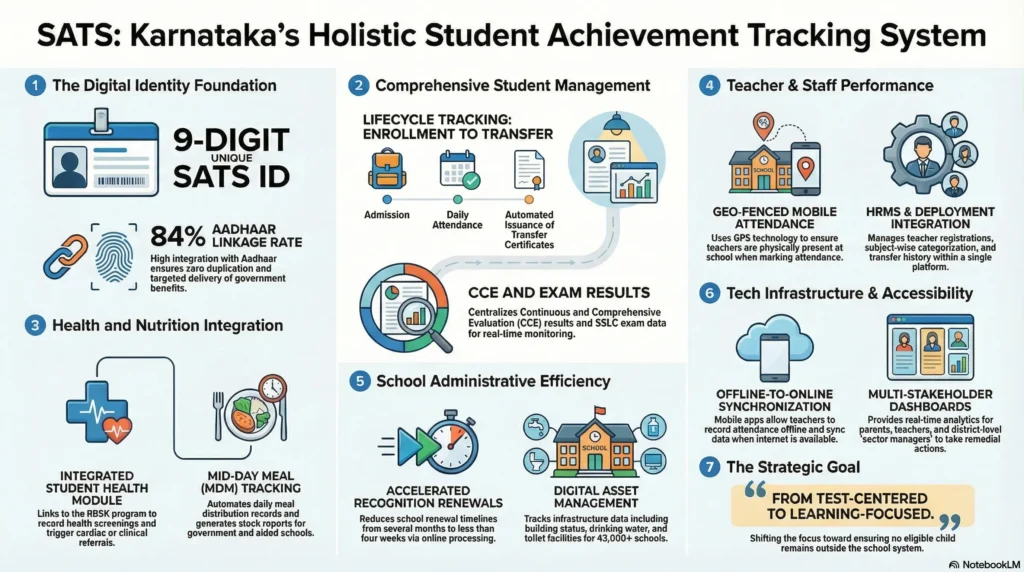
The SATS (Student Achievement Tracking System), frequently referred to as STS Karnataka, is a centralized, state-of-the-art database launched by the Karnataka Education Department in 2017. As a senior policy expert, I’ve observed SATS evolve into the backbone of the state’s educational administration. Its core mission is the end-to-end tracking of student academic progress and attendance while facilitating the seamless online transfer of certificates across government, aided, and private schools. By consolidating data into a single portal, the system ensures transparency and continuity in a student’s educational life cycle.
Understanding the SATS ID Karnataka
The fundamental unit of this system is the unique 9-digit identification number assigned to every student. While it is often confused with national identifiers, it serves a distinct purpose within the state’s digital architecture.
SATS ID vs. Aadhaar: A Strategic Comparison
- 9-Digit SATS ID: This is used exclusively for internal educational tracking within Karnataka. it links a student to their academic achievements, attendance records, and personal history (name, age, etc.).
- 12-Digit Aadhaar Number: Issued by the UIDAI, this national biometric ID is used within the STS Karnataka ecosystem for identity validation and seeding. It acts as a verification layer to ensure the student exists and is not a “ghost” entry.
- System Integration: Together, these IDs allow the government to monitor students who move between different school managements or districts, ensuring their data follows them throughout their schooling.
Navigating the Shikshana Kirana Portal and SATS Login
The Shikshana Kirana portal (sts.karnataka.gov.in) is the primary gateway for all school services. Access is strictly controlled through a role-based SATS login structure.
Types of SATS Login Options
To manage the vast amount of data, the portal offers four distinct entry points:
- Department Login: Used by education department officials for state and district-level monitoring.
- Management Login: Reserved for school-level administrative tasks, specifically for high-stakes processes like post-approval for aided institutions.
- School Applicant Login: The daily interface for data entry, student registration, and profile updates.
- PU Applicant Login: Specialized access for Pre-University college applications and data management.
The login interface for all users remains consistent, requiring a Username, Password, and a Captcha (as seen in the system’s official dashboard) to ensure secure access.
Technical Deep-Dive: Post Approval Process for Aided Schools
For aided schools, the Management Login is essential for navigating the “Post Approval” process—a prerequisite for securing government grants and post-validation. This process is divided into two distinct documentation stages.
Stage 1: Institutional Registration (7 Forms)
Management must first establish the legal and structural foundation of the school. Note that several fields are auto-fetched from the school’s existing records to reduce entry errors.
| Form Number | Requirements & Details | Auto-Fetched Components |
| Form 1 | Type of Governing Council: Includes Council name and registration authority. Covers categories: General, Minority, SC/ST, and recent renewals. | Name of Council, Competent Authority, Declaration Order/Date |
| Form 2 | High School Details: Lists schools run by the council across the state, including DISE codes. | Permission copy from school login |
| Form 3 | First Recognition: Requires documentation of the original permission to start the school. | First Recognition Copy |
| Form 4 | Inclusion Order: Documenting the school’s inclusion into the support grant system. | Latest Recognition Details |
| Form 5 | Posts Approved with Grant: Specific details of posts sanctioned for each teacher at the time of grant admission. | None |
| Form 6 | Teachers Roster: Comprehensive list of teachers appointed under the governing council in aided schools. | None |
| Form 7 | Basic Infrastructure: Building details, size of classrooms, floors, electricity, and facilities for disabled children. | None |
Stage 2: Operational and Performance Data (9 Forms)
The second stage shifts focus to student enrollment and historical performance.
| Form Number | Requirements & Details |
| Form 1 | Governing Council Declaration: Adding specific details of the committee members who attended meetings. |
| Form 2 | No Dispute Declaration: Certification and renewal orders stating there are no legal disputes within the council. |
| Form 3 | Student Enrollment Data: Auto-fetched directly from the current school dashboard. |
| Form 4 | Student Attendance Data: Auto-fetched from the dashboard once U-DISE freezing is finalized. |
| Form 5 | Teachers as per Enrollment: Reflects required teacher strength based on the data from Stage 1, Form 1. |
| Form 6 | General Seniority List: Reflects the teacher list provided in Stage 1, Form 6. |
| Form 7 | Last 5 Years SSLC Results: Historical academic performance, including percentage results and district averages. |
| Form 8 | Department Evaluation: Based on the official visit report regarding basic facilities (e.g., Labs, Sports rooms). |
| Form 9 | Vacant Posts: Details on vacancies, reasons for creation (e.g., retirement, resignation), and subject/medium. |
Critical Instruction for Form 9 (Additional Posts)
In Form 9, the management must fill the regular vacancy post details in the 1st Table. However, if the Commissioner of Public Instruction (CPI) has issued a specific order for an Additional Post, this must be documented in the 2nd Table (List of Additional Post).
The Official Approval Workflow
Once the application is confirmed by the management, it follows a rigorous 9-step hierarchy. You can track this progress via the “View Post Approval Tracking” menu:
- BCW (Block Case Worker Proceed)
- BOF (Block Office Manager Proceed)
- BEO (Block Education Officer Approval)
- DCW (District Case Worker Proceed)
- DOF (District Office Manager Proceed)
- DEO (District Education Officer Approval)
- DICW (Division Case Worker Proceed)
- DIOF (Division Office Manager Approval)
- DIV (Division Approval)
Note: Stage 3 of the application only opens after successful approval at the Division Level.
Aadhaar Seeding in SATS: Duplication and Benefits
Aadhaar linking is no longer just a recommendation; it is a vital policy tool. As of the 2023-24 academic year, over 84% of students across government, aided, and private schools have been linked.
The government’s rationale for 100% seeding includes:
- Identifying Duplication: The system has identified over 22,000 cases of students enrolled in multiple schools simultaneously, often to illicitly claim multiple sets of benefits.
- Targeted Resource Delivery: Ensuring that free food, uniforms, and textbooks reach the correct students.
- Tracking Dropouts: Identifying students who exit the system to allow for targeted re-enrollment interventions.
SATS MDM App and Integrated Government Services
The Education Department is increasingly leveraging SATS data for broader governance through the SATS MDM app, which manages Mid-Day Meals based on real-time attendance.
To streamline services, the department is sharing SATS/Aadhaar data across ministries to achieve the following:
- Health and Transport: Tracking student health records and facilitating the automated issuance and utilization of bus passes.
- State Scholarship Portal (SSP): Ensuring the seamless, direct benefit transfer (DBT) of scholarships to eligible beneficiaries.
- Academic Identity: Collecting Aadhaar to facilitate entrance test registrations and verify academic credentials for private school students.
Privacy Concerns and Legal Framework
The push for Aadhaar collection in private schools—reiterated in a February 2023 circular—has sparked debate. Parents of private school students often argue that Aadhaar should not be mandatory if they are not receiving government subsidies.
As a policy expert, it is crucial to understand the legal nuances:
- Section 7 of the Aadhaar Act: This provides the legal basis for the government to require Aadhaar for students receiving “subsidies, benefits, or services” funded by the state (e.g., textbooks or bus passes).
- The Karnataka Aadhaar Bill 2018: Aligning with national law, this bill stipulates that if an Aadhaar number is unavailable, the state must offer alternate and viable means of identification.
- Judicial Standpoint: The Supreme Court has consistently maintained that Aadhaar cannot be made an absolute mandatory requirement for general school admissions or welfare benefits.
Troubleshooting and Management Tips
Managing school data requires precision. Here are the key technical tips for SATS administrators:
- Handling Incorrect Data: If you find errors after a stage has been “frozen,” report it to the state level. Once the stage is unfrozen, you must properly sync and then save the data again before attempting to resubmit the application.
- Submission Indicators: Always look for the green tick mark next to each form. This is the only definitive indicator that the specific form has been successfully submitted to the system.
Conclusion
SATS Karnataka is redefining the educational ecosystem in India by creating a data-driven, transparent infrastructure. While the integration of Aadhaar remains a point of legal discussion, the benefits of the STS Karnataka database—from eliminating 22,000 duplicate entries to automating scholarships—are undeniable. For school managements and parents alike, maintaining an updated SATS profile is the only way to ensure students receive their entitled benefits and that their academic journey is accurately recorded.
Frequently Asked Questions (FAQs)
Is Aadhaar mandatory for my child’s school admission in Karnataka?
While the department has issued circulars (like the one in February 2023) insisting on Aadhaar for tracking, the Aadhaar Act and Supreme Court rulings state it cannot be mandatory for admission. If Aadhaar is unavailable, schools should accept alternate viable identification.
How do I retrieve a lost SATS ID for a student?
The SATS ID is a permanent 9-digit number. It can be retrieved by the school administration through the “Student Management” section of the SATS portal using the student’s name, date of birth, or previous school details.
What should management do if they find an error after “freezing” a stage?
They must report the error to the state-level authorities to request an “unfreeze.” Once authorized, they must re-sync the data, click “Save” to commit the changes, and then resubmit.
Can private school students opt-out of Aadhaar seeding?
While the government frames it as a “decree” for entrance tests and scholarships, legally, those not availing of government benefits can provide alternate identification as per the Karnataka Aadhaar Bill 2018.
Where can I perform a SATS login for a school?
All logins (Department, Management, School, or PU) are conducted through the Shikshana Kirana (School Services) portal at the official sts.karnataka.gov.in domain.