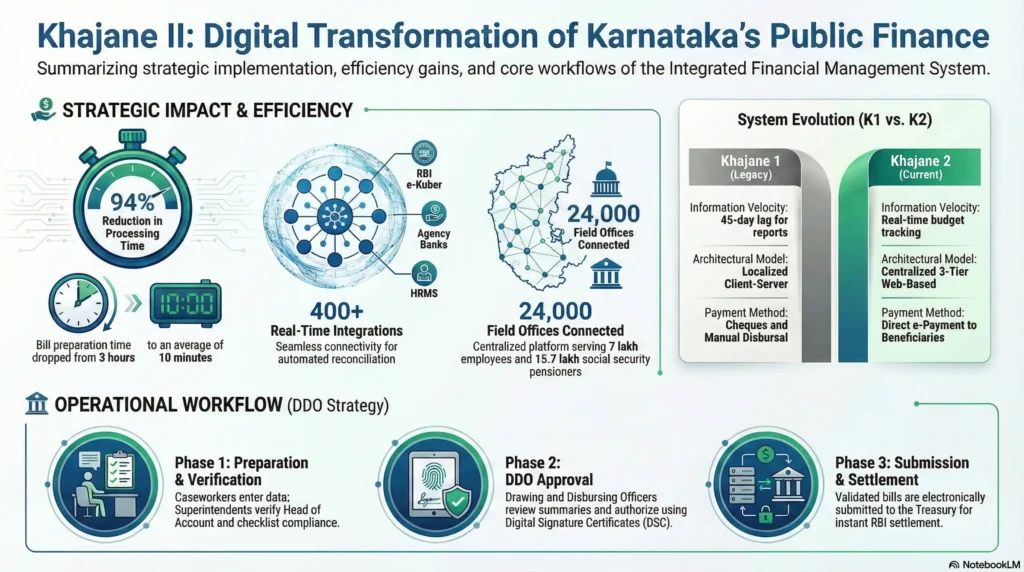
Khajane 2 (K2) is the flagship digital infrastructure project of the Government of Karnataka, serving as an Integrated Financial Management System (IFMS). This sophisticated platform automates the entire lifecycle of the state’s financial operations, from budget approval to the final rendering of accounts to the Accountant General. By digitising public finance, K2 aims to foster transparency, enhance accountability among stakeholders, and provide a secure electronic platform for all government-to-government (G2G) and government-to-citizen (G2C) transactions.
What is Khajane 2 (K2)?
Khajane 2 is an integrated electronic platform developed to manage the receipts and payments of government funds in real-time. It replaced the older “Khajane 1” (K1) system, which was primarily an IT platform for the computerisation of treasuries initiated in 2001. While K1 addressed basic treasury automation, the State Government decided in 2009 to upgrade to K2 to leverage web-based technologies and provide deeper integration with external stakeholders like the Reserve Bank of India (RBI) and commercial banks.
Evolution from Khajane 1 to K2
The transition to K2 represents a shift from simple computerisation to a “digital-first” philosophy. Unlike K1, which had a 45-day lag for consolidated reports, K2 provides real-time budget monitoring and expenditure tracking. K2 features over 400 real-time integrations with the RBI, HRMS, and agency banks, whereas K1 had minimal external connectivity.
User Access: Khajane 2 Login and Registration
Accessing the portal is the first step for both citizens and government officers to perform financial duties or pay taxes.
How to Register as a New User
To utilise services like challan payment, users must register on the official portal.
1. Visit the official website: https://khajane2.karnataka.gov.in.
2. Click the ‘New User Registration’ link.
3. Enter mandatory details, including full name, mobile number, email ID, and your 12-digit Aadhaar number.
4. Verify the registration via a One-Time Password (OTP) sent to the registered mobile.
5. Set up a unique username and password for future Khajane 2 login sessions.
Khajane 2 DDO Login for Government Officers
The Khajane 2 DDO login is a specialised interface for Drawing and Disbursing Officers (DDOs). DDOs are the administrative linchpins of the system, responsible for preparing and submitting financial claims. Through this portal, they manage bill submissions, payroll, allowances, and departmental expenditure.
Biometric and DSC Enrollment
Security for DDOs is high, involving a hierarchical flow of “Maker” (creator), “Checker” (scrutiniser), and “Approver”. All users must be registered with biometrics; Treasury Officers take finger impressions and map them to the employee’s KGID number. Additionally, Digital Signature Certificate (DSC) procurement is mandatory for performing activities on K2.
Essential Services: Challan Generation and Payments
Challan generation is the most common function for citizens paying license fees, property taxes, or other government dues.
Step-by-Step Khajane 2 Challan Generation
1. Login: Access your dashboard on the K2 portal.
2. Generate Challan: Select the “Generate Challan” option.
3. Remitter Details: Enter your name, address, and mobile number.
4. Selection of Purpose: Choose the correct government department, treasury code, and “Head of Account” (HoA). Caution: Selecting an incorrect HoA can lead to significant validation delays.
5. Submit: Verify all details and click submit to generate the unique payment form.
Payment Modes and Authorized Banks
Once the challan is generated, payments can be made through several channels:
• e-Payment: Immediate online transfer via Net Banking, Credit/Debit cards, or UPI.
• Bank Counter: Generate a physical challan to be paid offline at designated bank branches.
Integrating Karnataka Bank for SNA Accounts
Karnataka Bank has integrated its internet banking platform with K2 to support the Single Nodal Agency (SNA) account system for Centrally Sponsored Schemes. This ensures developmental funds reach targeted beneficiaries safely and securely.
Tracking Your Transactions
The K2 portal allows users to track the status of their payments and download official receipts for records.
How to Perform a Khajane 2 Challan Search
If your money has been debited but the status remains “Make Payment,” you should perform a K2 challan search.
1. Visit the portal and select ‘Challan Search’.
2. Enter the Reference Number, Date of Payment, or Department Code.
3. Click Search to retrieve the current transaction status.
Receipt Generation and Download
After a successful payment, the portal generates a digital receipt which serves as proof of transaction. You can download this by entering the challan reference number in the ‘Receipt Download’ section.
Technical Requirements and Troubleshooting
To ensure the portal functions correctly, users must adhere to specific desktop configurations.
System Configuration for Optimal Performance
The portal is optimised for specific legacy components to ensure stability.
• Browsers: Google Chrome versions 40–44 or Internet Explorer 11 are recommended.
• Drivers: Cogent 3M Bio-Metric drivers for authentication and Moser Baer/Aladdin e-Token drivers for DSC.
• Java: The machine should have the latest JDK installed.
Common Stability Issues and Peak Hours
Users have reported stability issues, especially when K2 is integrated with high-traffic sites like the Kaveri 2 portal. Common errors include the “stuck loop” during payment.
• Pro Tip: Some users find the site works best during off-peak hours, such as 5:00 AM, when user volume is lowest.
• Double Payments: If money is deducted but not updated, wait a few minutes before retrying; if it still fails, contact K2 support with your transaction details.