The Evolution of Property Services in Karnataka
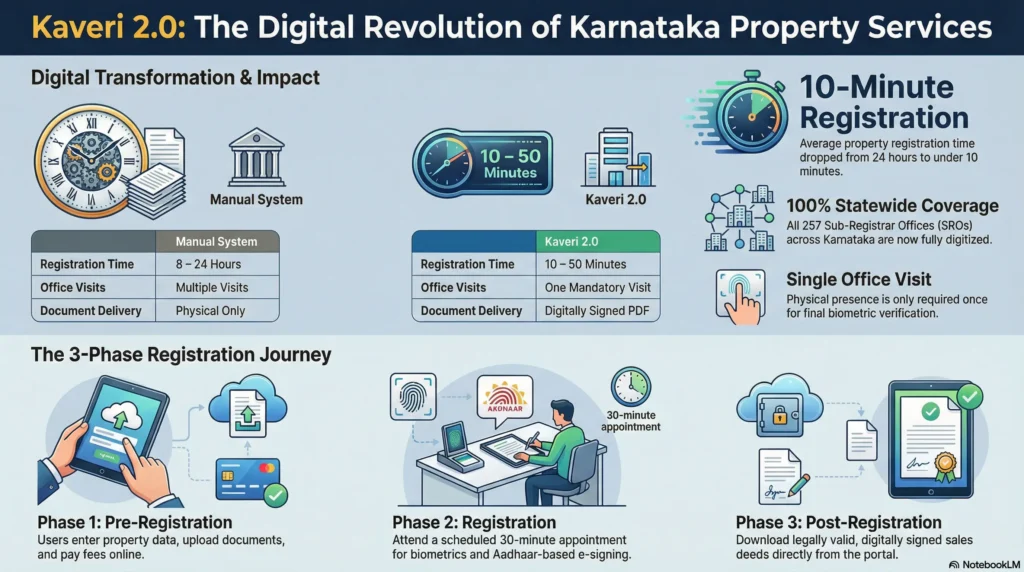
Kaveri 2.0 represents the modernised frontier of digital governance in Karnataka. Developed by the Department of Stamps and Registration in collaboration with C-DAC, this portal was designed to offer a transparent, middleman-free environment for property transactions. For the Bengaluru homebuyer, the system has successfully moved the goalposts from bureaucratic delays to a “10-minute registration” target. In practice, well-prepared applicants now experience an average “in and out” time at the Sub-Registrar Office (SRO) of approximately 8 minutes, effectively eliminating the need for brokers and reducing the potential for rent-seeking behaviour.
Core Services of the Kaveri Online Portal
The portal serves as a comprehensive digital interface for both guests and registered users. To ensure time-bound delivery, most of these services are integrated with the Sakala Service Guarantee, allowing users to track their applications via a unique Sakala number. Key services include:
- Property Registration: Online Pre-Registration Data Entry (PRDE) for sale deeds and various instruments.
- Stamp Duty & Registration Fee Calculator: High-precision estimation of statutory liabilities.
- Guidance Value Search: Locating government-fixed minimum values by Property Schedule details.
- Online Encumbrance Certificate (EC): Digitised search and download of a property’s financial history.
- Certified Copies (CC): Requests for officially digitised copies of registered deeds, essential for verifying the authenticity of a property’s history against the seller’s originals.
- Appointment Booking: Real-time scheduling of slots for physical verification at the jurisdictional SRO.
Mastering the Encumbrance Certificate (EC): Your Property’s Financial Health Report
The EC is the primary proof of a property’s financial cleanliness. It is indispensable for legal due diligence and home loan approvals. However, as a consultant, I must warn you: while the EC reflects registered transactions, it is not a “certificate of absolute title.”
Karnataka issues two types of ECs:
- Form 15: A detailed list of registered transactions (sales, mortgages, gifts, leases) found during the search period.
- Form 16 (Nil EC): A certificate issued when no registered encumbrances are found. It confirms the absence of recorded charges but does not account for unregistered claims.
Step-by-Step Guide to Downloading an Online EC
- Login: Visit kaverionline.karnataka.gov.in and register as a New User using your mobile and email for OTP verification.
- Service Selection: Select “Online EC” from the dashboard.
- Enter Property Identifiers: You must provide the exact Property Schedule details, including the District, Taluk, Hobli, Village, and Survey Number/PID.
- Specify Search Period: Enter the “From” and “To” dates.
- Critical Note: Online computerised records are generally limited to transactions from 01-04-2004 onwards. If you require a search for the parent chain prior to this date, you must visit the jurisdictional SRO for a manual legacy search.
- Payment: The fee is ₹35 for the first year of search and ₹10 for every additional year. Pay via Net Banking, UPI, or Card.
- Download: Once the SRO signs the document digitally, download the PDF from “My Applications.”
Obtaining Certified Copies (CC) of Registered Documents
If a seller cannot produce an original deed, or if you need to verify that the document provided to you has not been tampered with, you must apply for a CC. The workflow involves:
- Searching for the document using the Document Number, Year of Registration, and the specific SRO.
- Paying the applicable search and copying fees online.
- Downloading the digitally signed copy, which carries the same legal weight as the original for most administrative purposes.
Financial Planning: Guidance Value and Stamp Duty Calculators
The “Guidance Value” is the government-mandated minimum price for registration. Bengaluru saw a significant revision in late 2023, with values increasing by up to 50% in many prime corridors.
The Registration Rule: Properties must be registered at whichever is higher—the actual market value or the government guidance value. Consultant’s Pro-Tip: Registering a property below the guidance value is not merely a procedural error; it can lead to the document being impounded by the Sub-Registrar and may result in heavy legal penalties and recovery proceedings under the Karnataka Stamp Act.
The Pre-Registration Data Entry (PRDE) Workflow: A 3-Phase Process
To ensure you hit the 8-minute efficiency mark at the SRO, follow this phased process:
- Phase 1: Pre-Registration: Complete all data entry online, including party names and property descriptions. The system verifies party authenticity and calculates fees. Ensure you receive a Sakala number to guarantee time-bound processing. Pay fees and book your appointment slot here.
- Phase 2: Registration: Attend the jurisdictional SRO. Because your data is already in the system, this phase is limited to biometrics and the physical presentation of the sale deed.
- Phase 3: Post-Registration: Once approved, your digitally signed sale deed is generated and made available for download, completing the legal transfer of title.
Navigating Technical Errors and Troubleshooting
The Kaveri portal can be temperamental during peak usage. Use this table for quick resolution:
| Problem | Industry-Standard Solution |
| Multiple Active Sessions | Clear browser cookies/cache or use an incognito window immediately. |
| Payment Not Reflecting | Wait 24 hours for bank reconciliation. Check the dashboard “Payment Status” before retrying to avoid double debits. |
| Property Details Not Found | Re-verify the Survey Number or PID. If the search spans pre-2004, you must initiate a legacy search at the SRO. |
| Server Slowdowns | Avoid peak hours. Access the portal during non-peak windows: before 9:00 AM or after 6:00 PM. |
Advanced Insights: RTC, Khata, and the Kaveri-Bhoomi Integration
Successful homeownership requires managing documents across multiple government portals.
| Document Type | Primary Purpose | Source Portal |
| Encumbrance Certificate (EC) | Proves registered financial history and charges. | Kaveri 2.0 |
| RTC (Pahani) | Land ownership, soil type, and cultivation details (Agricultural). | Bhoomi Portal |
| Mutation Records | Tracking the history of ownership changes and transfers. | Bhoomi Portal |
| Khata / E-Khata | Tax assessment and municipal record-keeping. | BBMP / ULB (E-Swathu) |
| Sale Deed | The primary instrument for title transfer. | Kaveri 2.0 |
Legal Updates and the Future of Kaveri 2.0
The digital landscape is currently under heavy scrutiny due to recent legal developments:
- Civil Court Decree Workflow: Following a Karnataka High Court ruling, a new “Mutation Based on Civil Court Decree” workflow has been mandated. This closes a “legal vacuum” where court-ordered title changes were previously difficult to record in the transaction-heavy Kaveri system.
- Statewide Audit & Suspensions: A massive audit was recently triggered following the suspension of five sub-registrars, notably at the Sarjapur SRO. These officials allegedly misused “court order exemptions” to bypass mandatory E-Khata norms. Consequently, the department has tightened verification for any registration attempting to bypass standard digital property records.
Final Checklist for Bengaluru Homebuyers
Before you commit your life savings, complete this expert due diligence checklist:
- Full Title Search: Obtain ECs for the last 13 to 30 years to verify the complete chain of ownership.
- Pre-Registration EC: Re-order a fresh EC 24 hours before your registration date to ensure no last-minute liens have been placed.
- Verify Property Schedule: Ensure Survey Numbers and boundaries on the deed match the tax receipts and the RTC exactly.
- Mortgage Satisfaction: If the EC shows a prior mortgage, do not proceed without a “Registered Satisfaction of Charge” or “Discharge Deed.”
- Verify E-Khata: Confirm the property has a valid, active E-Khata. In the wake of the Sarjapur audit, registering without a verified digital Khata is a major red flag that could lead to your registration being flagged or cancelled.
Conclusion
Kaveri 2.0 has revolutionised property services in Karnataka, offering 24/7 accessibility and a transparent path to homeownership. By leveraging official digital services—such as the Guidance Value calculator and the PRDE workflow—you can achieve significant cost savings and “zero brokerage” efficiency. Always remember: the digital record is your strongest shield. Rely on official portal data to ensure the integrity and longevity of your real estate investment.