The real estate market in Karnataka, particularly in booming hubs like Bengaluru, has historically been complicated by paper-heavy bureaucracy and information asymmetry. For years, property buyers faced significant risks of purchasing “tainted” land—plots located on restricted lake beds, stormwater drains (rajakaluves), or government-owned forest zones. The introduction of the Dishaank app has fundamentally changed this landscape by democratising cadastral assets and putting the power of spatial verification directly into the hands of citizens.
Developed by the Karnataka State Remote Sensing Applications Centre (KSRSAC), Dishaank is a mobile-first platform that allows users to identify the “ground truth” of any land parcel within the state. By superimposing historical 1960 survey maps onto modern satellite imagery, the app bridges the gap between official government records and physical reality.
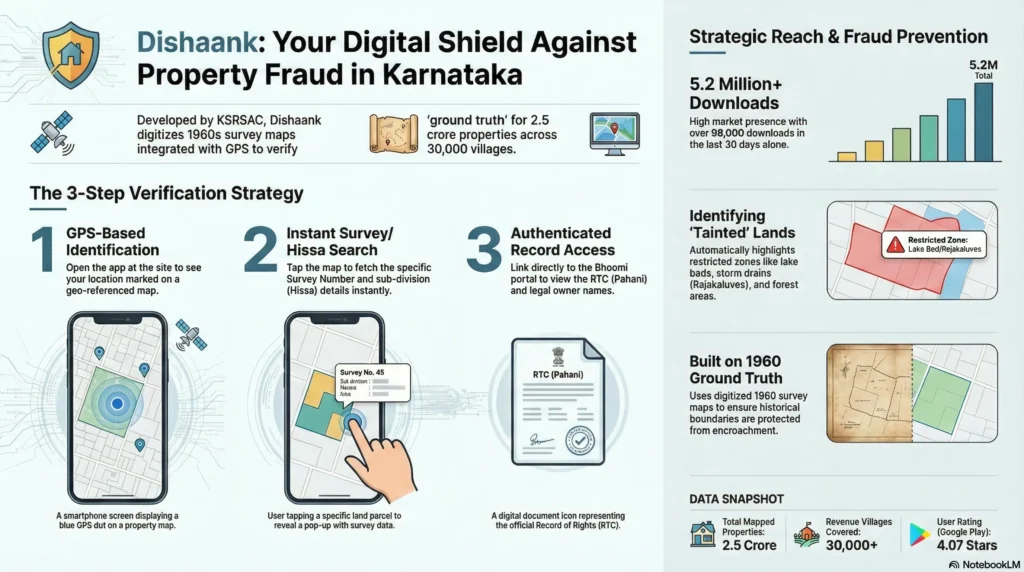
1. User Location: Mobile GPS identifies current coordinates.
2. Map Overlay: App superimposes 1960s Cadastral Maps onto live Satellite View.
3. Identification: User taps “Blue Dot” to reveal the specific Survey Number.
4. Deep Dive: App links to Bhoomi Portal for ownership (RTC) and restriction details.
What is the Dishaank App?
The Dishaank mobile application is the official tool of the Survey Settlement and Land Records (SSLR) department for disseminating spatial land data. Launched in March 2018, it serves as a critical extension of the Bhoomi project, which has been digitising textual land records in Karnataka since 1990.
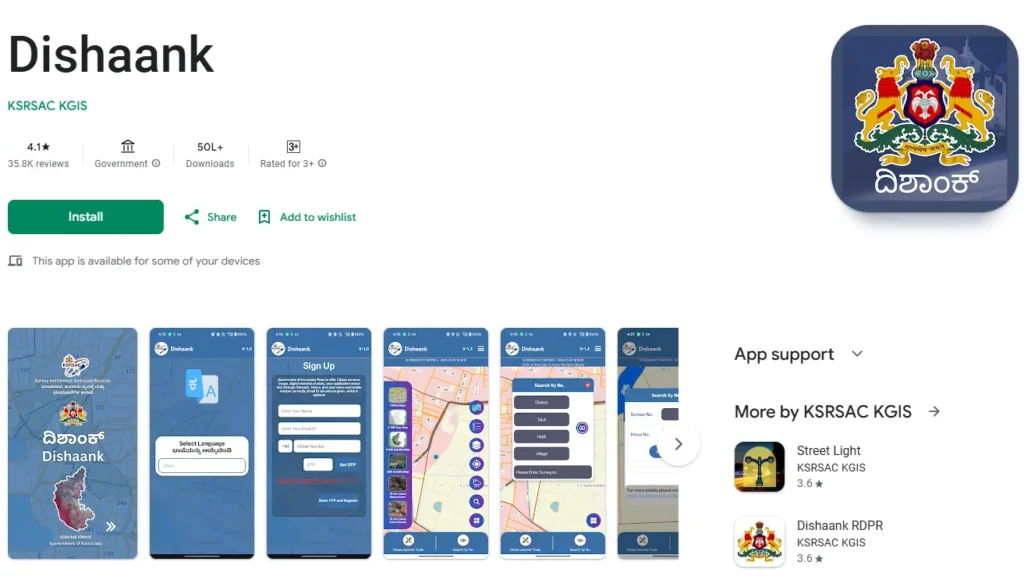
Institutional Genesis and the K-GIS Framework
The app operates under the Karnataka Geographical Information System (K-GIS) program. KSRSAC georeferenced over 30,000 village maps, creating a seamless mosaic on 50 cm resolution satellite data. This allows users to see exactly where legal boundaries lie in relation to modern landmarks like roads and fences.
Key Technical Specifications
• Developer: KSRSAC KGIS.
• Platform: Available for free on Android (5.0+) and iOS.
• Total Reach: Over 5.2 million downloads as of early 2026.
• Data Source: Original 1960 village maps where lakes and drains are clearly marked.
Key Features of the Dishaank Mobile Application
GPS-Enabled Land Identification
The most impactful feature is “Live Survey Number Identification”. Using your smartphone’s GPS sensor, the app marks your position with a blue dot. By tapping this dot, you instantly fetch the Survey Number and Hissa (sub-division) of the land you are standing on.
Integration with Bhoomi RTC Records
Dishaank is not just a map; it is a gateway to the Bhoomi Record of Rights, Tenancy, and Crops (RTC) database. Once a parcel is identified, users can select “More Details” to view:
• Owner Names: Single or joint ownership details.
• Land Extent: Area in acres and guntas.
• Liabilities: Active bank pledges or court stays.
• Mutation Status: History of ownership transfers.
Advanced Mapping and Measurement Tools
• Measurement of Distance and Area: Users can draw polygons on the map to calculate the approximate area of a plot in square metres or feet.
• Layer Toggles: Switch between satellite imagery, topographic maps, and standard street views.
• Weather Reports: A built-in widget provides real-time rainfall, temperature, and 3-day forecasts for the selected location.
How to Use Dishaank to Verify Property Details
Step-by-Step Guide for On-Site Verification
1. Download and Open: Install from the Google Play or Apple App Store.
2. Enable GPS: Set your phone location to “High Accuracy”.
3. Locate Blue Marker: Skip the welcome screen and find the blue dot on the map.
4. Tap for Details: Click the dot to see the District, Taluk, Hobli, Village, and Survey Number.
5. Access Owners: Click “More Details” and then “Owners” to see legal title holders.
How to Search Survey Numbers Remotely
If you are not on the site, use the hierarchical search:
• District → Taluk → Hobli → Village → Survey Number. The map will automatically zoom to and highlight the specific parcel boundaries.
Accessing Offline Village Maps
For verification in remote areas with poor network:
1. Go to the menu and select “Download”.
2. Select your village from the dropdown lists.
3. Access “Base Map Gallery” and select “Offline Maps” to view boundaries without data. Note: You can download a maximum of three villages simultaneously.
Why Every Property Buyer in Karnataka Needs Dishaank
Protecting Against Real Estate Fraud
Real estate scams often involve showing a buyer a prime plot while the documents refer to a different, less valuable location. Dishaank allows you to confirm that the physical site matches the survey number listed in your Sale Deed.
Identifying Restricted and Tainted Lands
Dishaank clearly labels restricted zones where construction is illegal. This prevents buyers from purchasing:
• Rajakaluves: Natural stormwater drains.
• Lake Beds (Kere Angala): Environmentally protected buffer zones.
• Gomal Land: Community grazing land.
• Forest Buffer Zones: Areas regulated under forest conservation laws.
Technical Limitations and Accuracy
GPS Variance and Notional Boundaries
Users must understand that mobile GPS sensors have an inherent margin of error between 3 and 10 metres. In dense urban areas or under tree cover, this offset can reach 30-40 feet. Consequently, the boundaries shown are notional; they help identify plots but are not legally valid for resolving boundary disputes.
Common Technical Issues
As of early 2026, users have reported several bugs:
• OTP Failures: Issues receiving One-Time Passwords during registration.
• Position Offset: Consistent 10-foot discrepancies reported on some iPhone models.
• Server Lag: Temporary Bhoomi server downtime can prevent RTC redirects.
Frequently Asked Questions (FAQs)
Can I use Dishaank data for legal court cases?
No. According to the user manual, the data is for informational purposes only and cannot be used as legal evidence for ownership or boundary confirmation.
Is Dishaank available for PC or Mac?
There is no direct desktop version. However, you can use it on a computer by installing an Android emulator like BlueStacks or NoxPlayer.
Does the app work in remote villages?
Yes, provided you have downloaded the village map for offline use beforehand.
What should I do if there is a discrepancy?
Any disputes or mapping errors should be reported to the SSLR department for administrative resolution.